Skip to content
Pace logo
  • Ride Pace
    Bus Tracker
    Trip Planner
    Routes & Schedules
    • Alerts & Notices
      • Alerts & Notices
    • Bus Services
      • Bus Services
      • Bus Tracker Tools
      • Express to Events
      • Expressway Routes
      • Getting to the Airport
      • Pulse
      • Routes, Schedules & Maps
      • Transit Centers & Park-n-Rides
      • Trip Planner
    • Fares & Passes
      • Fares & Passes
      • Buy ADA Paratransit Tickets
      • Reduced Fare
      • Sales Locations
      • Student Passes
      • Ventra Card & App
    • Passenger Facilities
    • Reservation-Based & Other Services
      • Reservation-Based & Other Services
      • ADA Paratransit & TAP
      • Dial-a-Ride
      • On Demand
      • RideShare Matching
      • Vanpool
    • Rider Resources
      • Rider Resources
      • ADA Paratransit Service Guides
      • Bikes on Buses
      • Bus Stop Policy
      • Passenger Safety
      • Shelters & Amentities
      • System Maps
      • Transit App (Trip Planning Tool)
  • Inside Pace
    Customer Service
    Doing Business
    Careers
    • About
      • About
      • Board of Directors
      • Employment
      • Locations
      • Citizens Advisory Board
      • ADA Advisory Committees
    • Data & Transparency
      • Data & Transparency
      • Budget Documents
      • Financial Reports
      • Freedom of Information
      • GTFS Data
      • Performance Metrics
      • Ethics Policy
    • Doing Business
      • Doing Business
      • Advertising Opportunities
      • Awarded Contracts
      • Disadvantaged Business Enterprise
      • iSupplier Portal
      • Transit Supportive Development Guidelines
      • Anticipated Procurement Opportunities
      • Guide to Doing Business with Pace
      • Open Solicitations
      • Bid Results
    • Events
      • Public meetings
    • Contact Pace
      • Contact Pace
      • Customer Service
      • Customer Survey
      • Frequently Asked Questions (FAQ)
      • Media Inquiries
      • Contact Directory
    • News
    • Policies & Legal Notices
      • Policies & Legal Notices
      • Equal Employment Opportunity
      • Public Hearings
      • Section 608
      • Title VI
    • Projects & Studies
      • Projects & Studies
      • I-290 / I-88 Express Bus Study
      • Driving Innovation Plan
      • Far South Halsted Corridor Study
      • ReVision Network Restructuring Project
      • Zero Emissions Project
    • Public Meetings
  • Contact Us
  • For New Riders
  • For Riders with Disabilities
  • For Visiting Riders

Bus Tracker Tools

Riders can use a variety of different Bus Tracker tools to get real-time information about when a bus departs from any location.
See Pace's Online Bus Tracker

Online Bus Tracker

Since 2002, Pace Bus Tracker is an Internet-based program that allows riders to access real-time bus schedule information for thousands of locations along nearly every bus route. Pace Bus Tracker can be accessed from desktop computers and web-enabled mobile communication devices. 

  1. Visit Bus Tracker
  2. Select your bus route, direction of travel, and your chosen bus stop
  3. The web page will display the next 3 predicted times for a bus to arrive at that location.

This technology, enabled by IBS, makes using public transportation easier by enhancing customer information. 

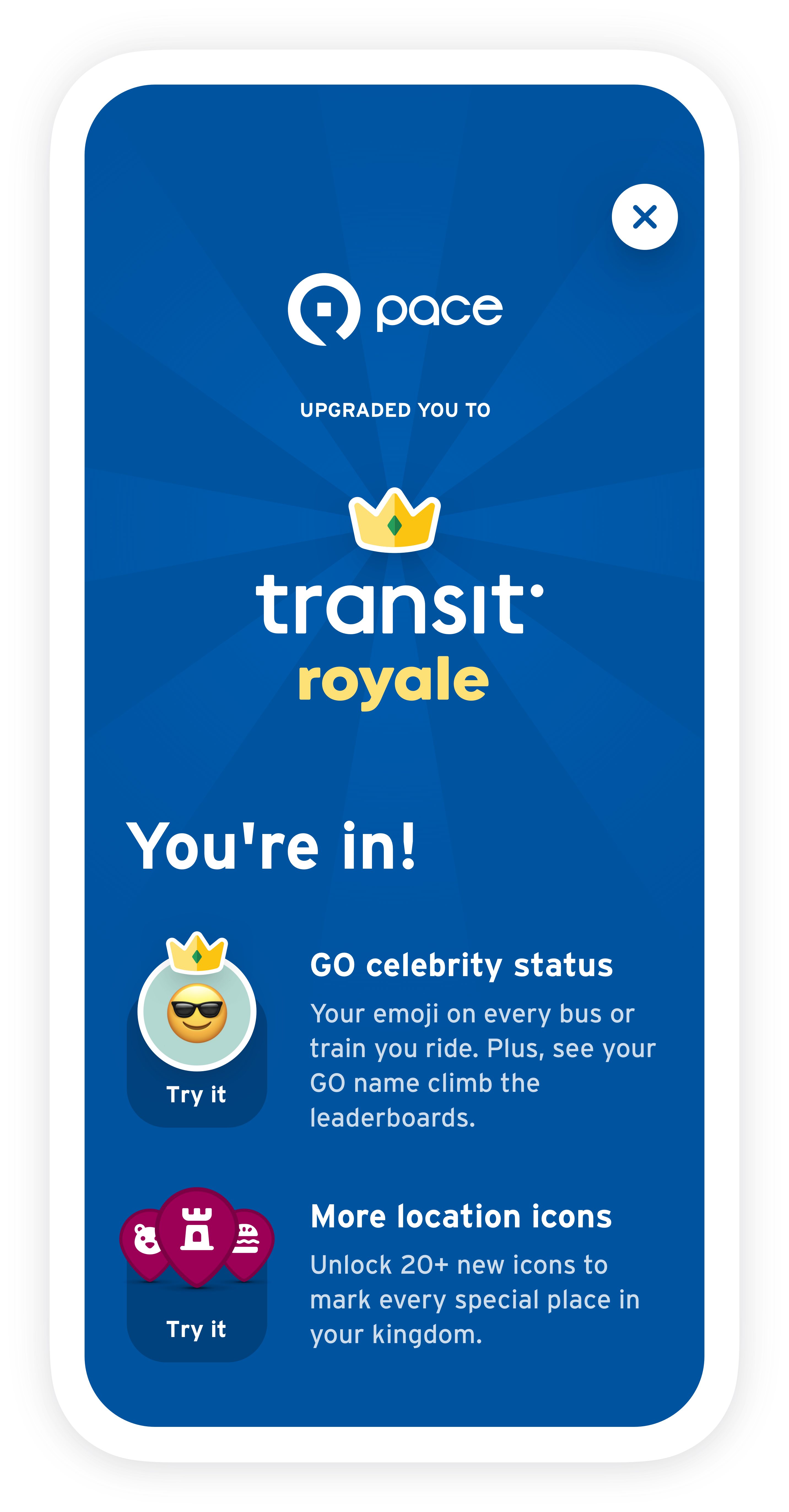
smartphone image of the Transit app's Royale upgrade screen with Pace logo

The Transit app

For smartphone users interested in using an app for trip planning and real-time bus tracking, Pace recommends the Transit app. Once it identifies you as a Pace rider, you'll automatically get the upgraded ("Royale") version of the app, which shows scheduled arrivals/departures for the whole day along with some fun app customization options.

You’ll see nearby bus arrivals as soon as you open the app. Transit has real-time information for our transit services to help you get around the region. You can also combine bus service with other transport options in Transit’s trip planner. Even more exciting developments in that regard are coming in 2023, with Pace and Transit partnering to show Pace On Demand service options in trip planning results.

You can also get user-friendly step-by-step guidance with GO. Tap GO to be reminded when to leave, when to transfer, and when to get off the bus. Subscribe to push notifications so you know when you’re almost there and when you’ve arrived. Additionally, with GO crowdsourcing, you can share real-time reports on crowding and accessibility and boost the accuracy of real-time info for fellow riders.

Our passengers automatically receive a free upgrade to Royale, the premium subscription in the Transit app! With Royale, riders unlock leaderboards, avatars, and access to all the newest features.

Download Transit here

Bus Tracker Live Map

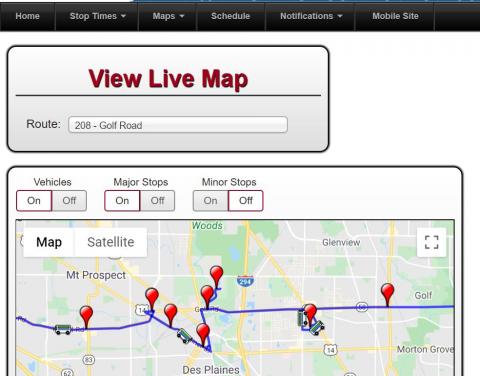
Pace's Bus Tracker also displays a Live Map on which you can see where buses are located in real time. To use this feature, choose Google or Bing from the "Maps" drop-down menu, and then select a Pace route. Then, you can choose to display the vehicles, the major stops, and/or the minor stops using the "on"/"off"buttons above the map. If you click on one of the pins (which correspond to each bus stop), the system displays the next three arrival times of buses in each direction.

You can also select Multi-Route map from the "Maps" drop-down menu to use these features, and to view several different routes at once in real time.

This is an image of what your screen would look like when using Pace's online bus tracker "live map" feature.

Bus Tracker Text Messaging Service

Pace customers can get real-time information about when the next bus is arriving at their stop by simply sending a text message (or "SMS") with a mobile phone.

How do I get the next bus arrival time?

Type "41411" as the phone number to which you are sending a text message. Then, in the body of the message, type "Pace", then a space, then the code number you see on the bus stop sign. When you send that text message, a bounceback message should come to your phone in a matter of seconds. That message will look like this:
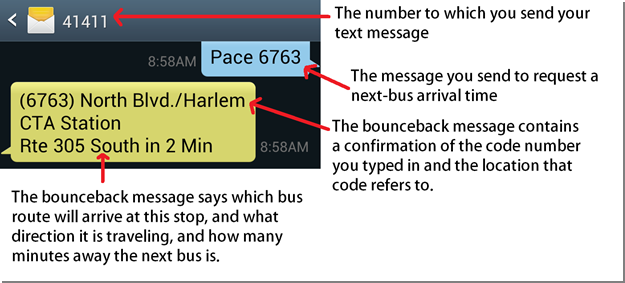
This is an image of what your phone screen will look like if you sign up for Pace's bus tracker text messaging service.

The first time you use the service, you'll get an introductory message saying "Welcome to Pace." Please be assured Pace won't spam you with text messages. You will only get real-time bus arrival information when you request it with a text message that you send. 

How do I know the code number for my bus stop?

The easiest way to determine the code number for your bus stop is to see it on the bus stop sign:
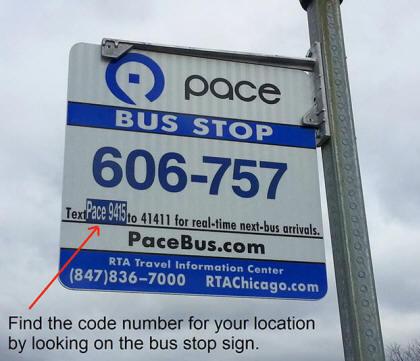
This is an image of a bus stop sign that features a text code to sign up for the bus tracker text messaging service.

If the bus stop sign at which you regularly board does not yet have a code, you can use the Pace website to look up the real-time bus arrival information for your stop and, at the same time, obtain the code number which you can use for future reference:

  • Visit the accessible version of Bus Tracker, select your bus route, direction of travel, and your chosen bus stop, and the web page will display the next 3 predicted times for a bus to arrive at that location.

  • While on that page (which is displaying the predicted arrival times), look at the address bar (also called "URL bar") at the top of your web browser. The URL displayed there has a 3-to-5-digit number at the very end of it. That number is the stop identification code number. It can be typed into a text message in the manner described above to get information about that particular bus stop.

Digital Bus Tracker Signs

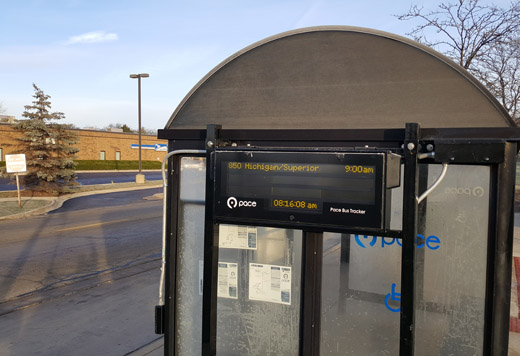
Pace has installed many electronic signs that continually display bus arrival times (or departure times, if located at the beginning of a bus route) and is in the process of installing dozens more. Just like the other Bus Tracker tools, these signs show in real time any arrivals or departures within the next 60 minutes, and count down to the bus's predicted arrival or departure.

This is an image of a digital bus tracker sign installed on one of Pace's bus shelters.

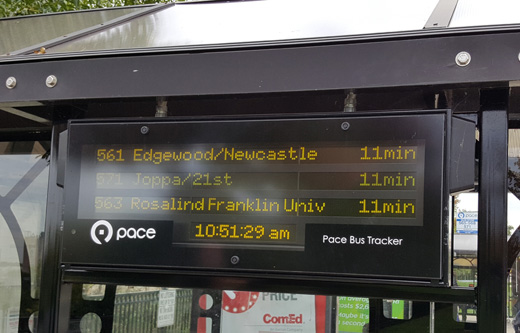
Each sign lists the route number, the route's destination, and the number of minutes until arrival (or departure). When the next bus is more than 30 minutes away, the sign instead shows the arrival time instead of the number of minutes before arrival. The shelters which house these new digital signs also have paper maps and schedules posted in display windows, for customers who seek additional information about the bus routes that serve that location.

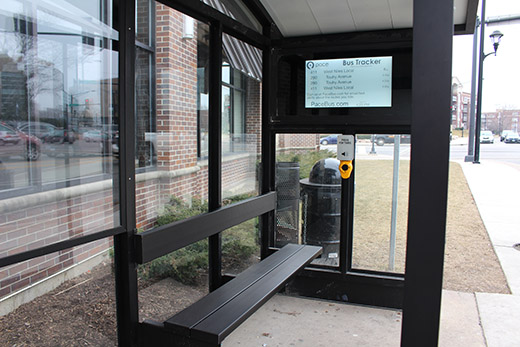
This is an image of an e-ink bus tracker sign imbedded in a Pace bus shelter.

Thus far, the signs have been installed at locations that have lots of bus passenger activity. Some signs have been attached to existing shelters; others are embedded in the side wall of a newly installed shelter. Over the course of the next few years, more signs will be added at bus stop shelters and transit centers throughout Pace's six-county service area.

This is a closeup image of a digital bus tracker sign.

Email Alerts

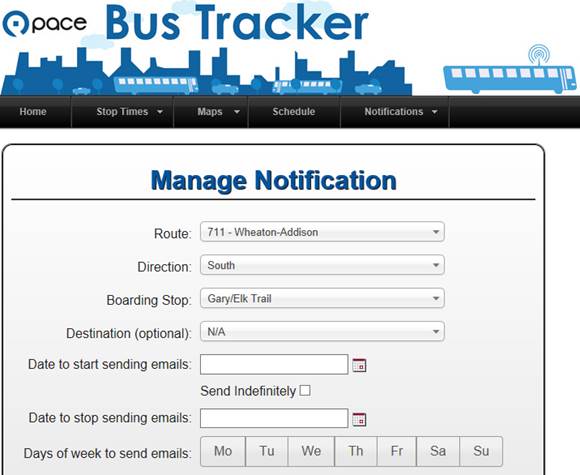
Within the Bus Tracker section of Pace's website, create an account to manage what type of information you want to receive. Once you have created an account or logged in to your existing account, you can subscribe to an email which alerts you to the arrival time of your chosen bus route at your chosen stop on that particular day. For instance, if you leave work around 5:00pm every day and ride Route 711 to your home, you can subscribe to an email that is sent to you every day at 4:55pm, detailing the predicted arrival times of (for instance) the southbound Route 711 bus at Gary Avenue and Elk Trail. The arrival times in the email are based on what the bus is doing at that exact moment the email is sent to you. Your subscription can be configured to only send the emails on certain days of the week and only at certain times of day.

This is an example of what your computer or device screen would look like if you signed up for bus tracker email alerts.


Ventra App

The Ventra app, available for Apple or Android phones, provides real-time transit information for Pace, CTA and Metra services. Download it to your phone today to track your buses and trains, as well as ensure your Ventra Card always has a pass or adequate transit value loaded. See the Ventra website for more information.

QR Code

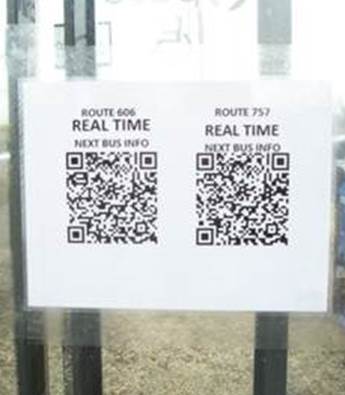
Many Pace shelters contain a "quick response" (QR) code posted on the wall of the shelter. If you have a web-enabled phone and you have downloaded a QR code scanning app (which are free to download), you can scan the QR code and be taken to the Bus Tracker page on PaceBus.com which displays the real-time bus arrival data for that particular bus stop at that time.

This is an image of a bus tracker QR code posted inside a Pace bus shelter.

By scanning this QR code, you save the time and hassle of having to navigate multiple web pages on your smartphone to select your bus route, your direction of travel, and your current location. The code posted in that shelter has all that information in it, so all you do is scan the code to see the correct information for the bus you are intending to ride.

Disclaimer

Neither Pace, nor its contractor, Trapeze, make any claims regarding the accuracy of its predicted arrival times. The user assumes the entire risk related to his/her use of any and all information on PaceBus.com and Pace's text messaging service. Pace provides such information "as is," and Pace disclaims any and all warranties, whether express or implied, including (without limitation) any implied warranties of merchantability or fitness for a particular purpose. Under no circumstances will Pace (or its directors, officers, employees, or agents) be liable for the accuracy, quality or reliability of any of the bus arrival predictions or other data presented here. In no event will Pace be liable to you or to any third party for any direct, indirect, incidental, consequential, special or exemplary damages or lost profit resulting from any use or misuse of these data.

Sign up for Email or Text Alerts

Sign up now
  • Alerts & Notices
  • Bus Routes, Schedules and Maps
    • Trip Planner
    • Pulse Rapid Transit
    • Bus Tracker
  • Reservation-Based and Other Services
    • ADA Paratransit Services
    • On Demand
    • Vanpool
    • Community Vehicle Programs
  • Schedules
  • Rider Guide/Rider FAQs
  • Maps
    • On Demand Zones
    • Dial-A-Ride Zones
    • Park-n-Ride Locations
    • System Maps
    • Transit Center Locations
  • Riders with Disabilities
  • Fares & Passes
    • Pay with Ventra
    • Reduced Fare
    • Buy ADA Paratransit Tickets
  • About
    • Leadership
    • Office Locations
  • Customer Service
    • Customer Service Form
    • Directory
  • Employment
  • News
  • Open Data & Transparency
    • Freedom of Information
  • Policies & Legal Notices
  • Projects & Studies
  • Doing Business with Pace
    • Advertising Opportunities
    • Awarded Contracts
    • Contracting Opportunities
  • Disadvantaged Business Enterprise
  • Report website issues

Facebook icon Twitter icon YouTube icon Instagram icon NextDoor iconLinkedIn icon

© Copyright Pace Suburban Bus | All Rights Reserved | Privacy Policy | Sitemap